

Upgrade your plan
To upgrade to Developer or Startup plans, go to Settings, then Usage & billing > Change plan. Upgrading to a Scale plan requires the Browserbase team. Book a demo to get started. You can also reach us at sales@browserbase.com.
Upgrade to Verified
Contact Browserbase to confirm Verified eligibility and enable it for your project. Learn what Verified includes and how it works.
Invoices
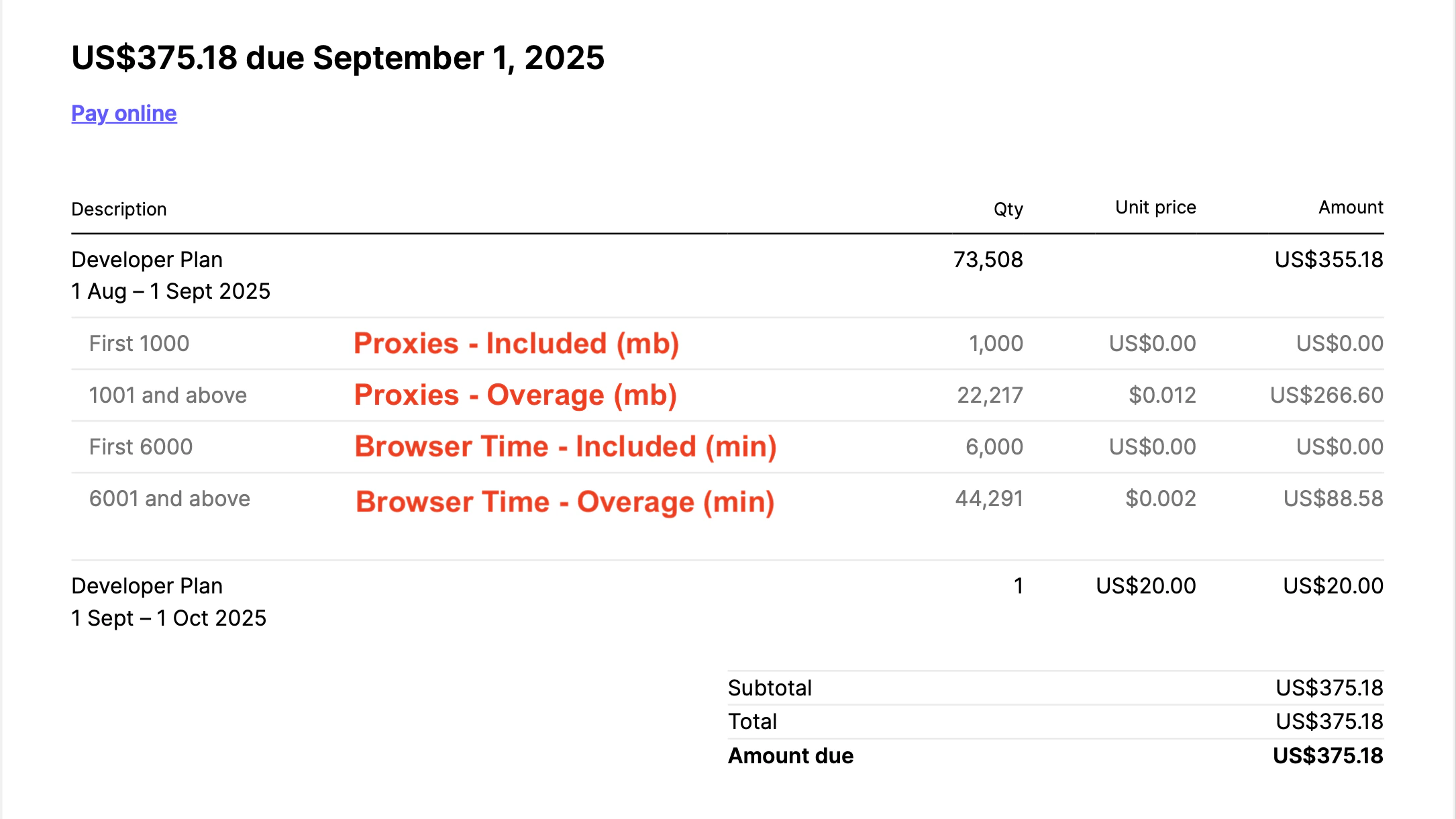
Understanding your invoice
Here’s the breakdown of your monthly bill:- Base Plan Cost
- Proxy Costs
- Browser Time Costs
Adding VAT to invoices
To add your tax ID to future invoices:- Go to Settings > Usage > Manage organization plan
- Click Manage billing to open the Stripe customer portal
- Click Update information and add your tax ID
Need your tax ID added to a previous invoice? Reach out via the support page or support email.
Cancel your plan
To cancel your Browserbase plan, go to Settings, then Usage & billing > Change plan.Related guides
Plans
Compare plan features for your browser workloads.
Measure usage
Inspect usage to understand your browser costs.