

Documentation Index
Fetch the complete documentation index at: https://docs.browserbase.com/llms.txt
Use this file to discover all available pages before exploring further.
Upgrade your plan
To upgrade to Developer or Startup plans, go to Settings, then Usage & billing > Change plan. Upgrading to a Scale plan requires the Browserbase team. Book a demo to get started. You can also reach us at sales@browserbase.com.
Upgrade to Verified
Verified is available on Scale plans. Learn what Verified includes and how it works.
Invoices
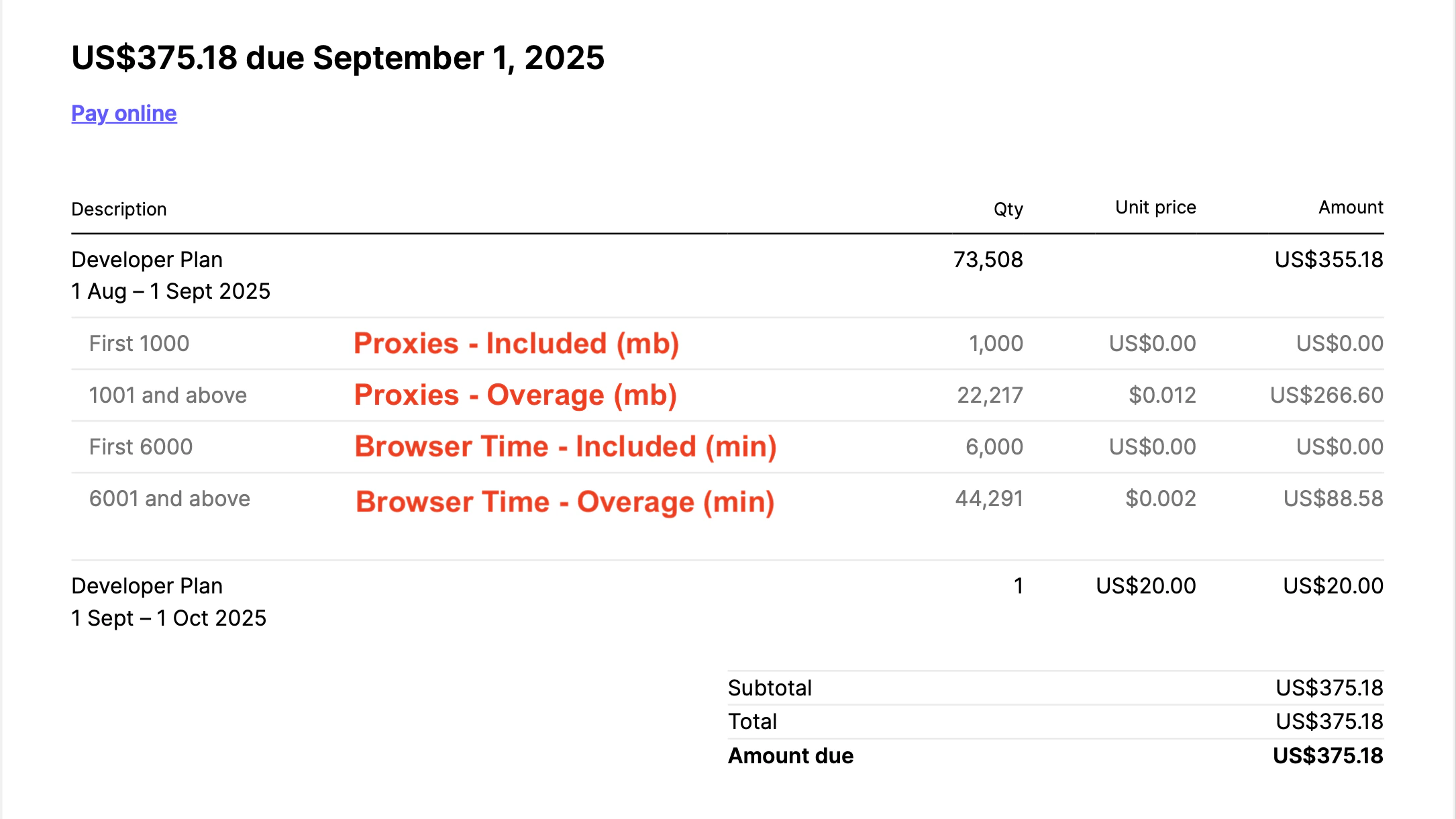
Understanding your invoice
Here’s the breakdown of your monthly bill:- Base Plan Cost
- Proxy Costs
- Browser Time Costs
Adding VAT to invoices
To add your tax ID to future invoices:- Go to Settings > Usage > Manage organization plan
- Click Manage billing to open the Stripe customer portal
- Click Update information and add your tax ID
Need your tax ID added to a previous invoice? Reach out via the support page or support email.